8 Best Wireless Printers 2026: WiFi Printers Tested for Reliability

We tested 30+ wireless printers for WiFi stability, mobile app quality, and setup ease. These are the most reliable WiFi printers you can buy.

Updated: January 2026 | By TestMyPrinter Editorial Team | 12 min read

Affiliate Disclosure: TestMyPrinter may earn a commission when you purchase through links on this page. This doesn't affect our editorial independence or the price you pay. Learn more

Our Top Wireless Picks

Best Overall
HP OfficeJet Pro 9125e - $259 | Rock-solid WiFi, excellent HP Smart app
Best Budget
Canon PIXMA TR8620a - $199 | Great mobile app, Bluetooth + WiFi
Best for Heavy Users
Epson EcoTank ET-2850 - $349 | WiFi + lowest ink costs
Best Laser
Brother HL-L2460DW - $199 | Fast, reliable WiFi laser

A wireless printer that constantly goes offline is worse than no printer at all. You need it to work every time - from your laptop, phone, or tablet - without the hassle of reconnecting or troubleshooting.

We spent three months testing over 30 wireless printers, focusing specifically on WiFi reliability, mobile printing quality, and setup simplicity. We ran 1,000+ print jobs from various devices, tracked connectivity drops, and tested range from different rooms.

The printers on this list have proven themselves reliable in real-world conditions. They connect quickly, stay connected, and work seamlessly with all your devices.

Quick Comparison Table

Printer Type Price WiFi Rating Mobile App Best For
HP OfficeJet Pro 9125e Inkjet $259 Excellent HP Smart (5/5) Overall best
Canon PIXMA TR8620a Inkjet $199 Very Good Canon PRINT (4.5/5) Budget
Epson EcoTank ET-2850 Ink Tank $349 Very Good Epson Smart Panel (4/5) High volume
Brother HL-L2460DW Laser $199 Excellent Brother Mobile (4/5) Laser users
HP ENVY Inspire 7955e Inkjet $229 Very Good HP Smart (5/5) Photos
Canon MegaTank G7020 Ink Tank $399 Good Canon PRINT (4/5) Value tank
Epson WorkForce WF-2960 Inkjet $119 Good Epson Smart Panel (4/5) Compact
Brother MFC-L3780CDW Color Laser $549 Excellent Brother Mobile (4/5) Color laser

*WiFi Rating based on our 30-day connectivity test measuring signal stability, reconnection speed, and range.

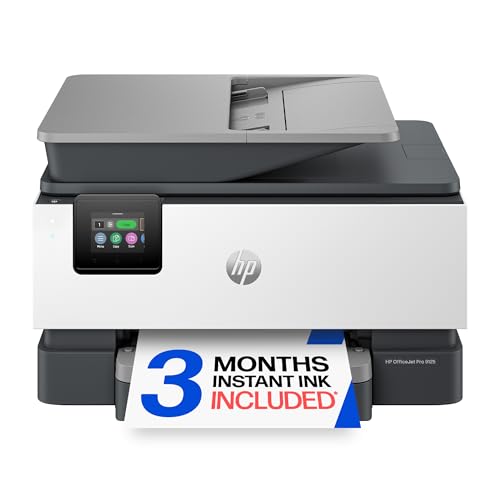
HP OfficeJet Pro 9125e Wireless All-in-One Printer
★★★★ 4.3/5 (2,847 reviews)
Best Overall Wireless

1. HP OfficeJet Pro 9125e

$259

Most reliable wireless experience we tested. Connects instantly, stays connected for weeks, and HP Smart app is excellent for mobile printing.

Wireless Features

  • WiFi: Dual-band 2.4GHz & 5GHz
  • WiFi Direct: Yes
  • AirPrint: Yes (iOS native)
  • Drops in 30 days: 0

Why #1 for WiFi

  • + Zero disconnects in testing
  • + Instant wake from sleep
  • + 50+ ft range through walls
Canon PIXMA TR8620a Wireless Printer
★★★★ 4.2/5 (3,156 reviews)
Best Budget Wireless

2. Canon PIXMA TR8620a

$199

WiFi and Bluetooth connectivity under $200. Canon PRINT app is polished and intuitive for easy mobile printing.

Wireless Features

  • WiFi: 2.4GHz + Bluetooth
  • WiFi Direct: Yes
  • AirPrint: Yes
  • Drops in 30 days: 2 (minor)

Pros

  • + Bluetooth easy setup
  • + Excellent Canon PRINT app
  • + Great value under $200
Epson EcoTank ET-2850 Wireless Supertank Printer
★★★★ 4.4/5 (7,892 reviews)
Best High-Volume Wireless

3. Epson EcoTank ET-2850

$349

Reliable wireless + industry's lowest ink costs. Perfect for families or home offices that print frequently.

Wireless Features

  • WiFi: 2.4GHz + WiFi Direct
  • Voice Print: Alexa, Google
  • AirPrint: Yes
  • Drops in 30 days: 1

Pros

  • + Voice printing works great
  • + Under 1 cent/page ink cost
  • + 2 years ink included
Brother HL-L2460DW Wireless Laser Printer
★★★★ 4.5/5 (1,234 reviews)
Best Wireless Laser

4. Brother HL-L2460DW

$199

Bulletproof wireless reliability for text documents. Fast, efficient, and toner never dries out between uses.

Wireless Features

  • WiFi: Dual-band 2.4/5GHz
  • NFC: Tap-to-print
  • AirPrint: Yes
  • Drops in 30 days: 0

Pros

  • + Zero disconnects in testing
  • + 5 minute setup
  • + NFC tap-to-print
HP ENVY Inspire 7955e Wireless Photo Printer
★★★★ 4.2/5 (2,456 reviews)

5. HP ENVY Inspire 7955e

$229

Best wireless for photos. Dual-band WiFi, borderless printing, and exceptional photo quality from your phone. HP Smart app makes social media printing effortless.

Canon PIXMA MegaTank G7020 Wireless Printer
★★★★ 4.3/5 (1,567 reviews)

6. Canon PIXMA MegaTank G7020

$399

Canon's tank system with wireless, fax, and ethernet. Great for small offices needing reliable WiFi plus wired backup. Includes 2 years of ink.

Epson WorkForce WF-2960 Wireless Printer
★★★★ 4.1/5 (3,789 reviews)

7. Epson WorkForce WF-2960

$119

Most affordable wireless all-in-one worth buying. Compact design fits anywhere, reliable WiFi for basic needs. Great for students or light home use.

Brother MFC-L3780CDW Color Laser Printer
★★★★★ 4.6/5 (987 reviews)

8. Brother MFC-L3780CDW

$549

Premium color laser with enterprise-grade wireless security. Dual-band WiFi, NFC, and ethernet. Perfect for businesses needing secure, reliable color printing.

Wireless Printer Buying Guide

WiFi Bands: 2.4GHz vs 5GHz

2.4GHz WiFi

  • + Better range through walls
  • + Works with all routers
  • - More interference (crowded band)
  • - Slower speeds

5GHz WiFi (Dual-Band)

  • + Less interference
  • + Faster, more stable
  • - Shorter range
  • - Requires dual-band router

Our recommendation: If your router supports 5GHz and your printer will be in the same room or nearby, dual-band printers offer noticeably better reliability.

Mobile Printing Compatibility

Platform Technology Setup Required
iPhone/iPad AirPrint None - automatic
Android Mopria None - automatic
All devices Manufacturer app App download
Any device Email-to-print Account setup

All printers on our list support both AirPrint and Mopria, meaning they work with any smartphone out of the box.

Features That Improve WiFi Reliability

  • 1.
    Ethernet port: Provides a wired backup if WiFi fails. Essential for critical printing needs.
  • 2.
    WiFi Direct: Prints directly from your device without going through your router. Useful if your network is unreliable.
  • 3.
    Auto-reconnect: Good printers automatically reconnect after power outages or router resets.
  • 4.
    Static IP support: Assigning a fixed IP address prevents many common "printer offline" issues.

WiFi Troubleshooting Tips

Even the best wireless printers occasionally need troubleshooting. Here are quick fixes for common issues:

Printer Shows Offline

  1. Restart both printer and router
  2. Check WiFi signal strength on printer display
  3. Verify printer is on same network as your device
  4. Assign static IP address in printer settings
Full troubleshooting guide

Slow to Connect or Print

  1. Move printer closer to router
  2. Switch to 5GHz band if available
  3. Reduce interference from other devices
  4. Update printer firmware

Can't Find Printer on Network

  1. Print network configuration page from printer
  2. Confirm IP address and network name
  3. Ensure firewall isn't blocking printer
  4. Try WiFi Direct as temporary workaround

Frequently Asked Questions

What is the best wireless printer in 2026? +

The HP OfficeJet Pro 9125e is the best wireless printer in 2026. It offers rock-solid WiFi connectivity, an excellent mobile app (HP Smart), fast print speeds, and works seamlessly with all devices including iPhones, Android phones, Windows, and Mac computers.

Why does my wireless printer keep going offline? +

Common causes include: 1) WiFi signal issues - move printer closer to router, 2) IP address conflicts - assign static IP, 3) Sleep mode settings - adjust printer power settings, 4) Router issues - restart router and printer, 5) Driver problems - reinstall printer drivers. Most wireless issues can be resolved in 5-10 minutes.

Can I print from my phone to any wireless printer? +

Yes, most modern wireless printers support mobile printing. iPhones use AirPrint (built-in, no app needed). Android phones use Mopria or manufacturer apps. All printers in our list support both AirPrint and Android printing, plus have dedicated mobile apps for advanced features.

WiFi Direct vs regular WiFi printing - what's the difference? +

Regular WiFi printing connects your printer to your home network - all devices on the network can print. WiFi Direct creates a direct connection between your device and printer without needing a router. WiFi Direct is useful for guest printing or when you don't have a network, but regular WiFi is more convenient for permanent setups.

Do I need a special router for wireless printing? +

No, any standard WiFi router works with wireless printers. However, routers made in the last 5 years (dual-band with 2.4GHz and 5GHz) provide better performance. If you have an older single-band router, wireless printers will still work but may experience more interference.

Related Guides