Best Color Laser Printer 2026: Professional Quality Meets Speed
Top picks for vibrant, fast, and cost-effective color printing
Top 3 Picks for 2026
Tap any product to see current Amazon prices

HP Color LaserJet Pro M255dw

Brother HL-L3280CDW

Lexmark CS331dw
As an Amazon Associate, we earn from qualifying purchases
By TestMyPrinter Team | Updated 2026
Table of Contents
Looking for the best color laser printer in 2026? You're in the right place. Color laser printers have revolutionized professional printing by delivering vibrant, crisp output at speeds that leave inkjet printers in the dust. Whether you're a small business owner printing marketing materials, a design professional producing client presentations, or a home office user who needs occasional color documents, choosing the right color laser printer can transform your productivity.
Unlike their monochrome counterparts, color laser printers use four separate toner cartridges (cyan, magenta, yellow, and black - known as CMYK) to produce full-color documents. Modern color laser technology has evolved dramatically, with single-pass printing engines that apply all four colors simultaneously, dramatically reducing print times compared to older multi-pass designs.
The best color laser printers balance speed, print quality, running costs, and reliability. In this comprehensive guide, we researched and reviewed the top models against manufacturer specs and verified owner reviews to help you find the perfect color laser printer for your needs and budget. From compact desktop units to feature-rich all-in-ones, we'll help you navigate the options and make an informed decision.
Why Choose Color Laser Technology?
Understanding Color Laser Printing
Color laser printers work by using static electricity to transfer colored toner powder onto paper, then fusing it with heat. This creates durable, smudge-proof prints that won't run if they get wet. The four-color CMYK system allows these printers to reproduce a wide range of colors suitable for business documents, presentations, and basic graphics.
Single-Pass vs Multi-Pass Technology: Modern color laser printers primarily use single-pass technology, where all four toner colors are applied in one pass through the imaging system. This results in faster print speeds and better color registration. Older or budget multi-pass printers apply each color separately, making them slower but sometimes more affordable.
Advantages:
- Fast color printing (15-30+ PPM)
- Lower cost per color page than inkjet
- No dried ink or clogged nozzles
- Sharp text and vibrant graphics
- Ideal for high-volume color printing
- Professional-quality output
- Toner doesn't dry out when not in use
- Handles various paper stocks well
- Durable, water-resistant prints
Considerations:
- Higher upfront investment than inkjet
- Larger footprint - needs desk space
- Four toner cartridges to replace
- Not ideal for photo printing
- More expensive than monochrome lasers
- Can be heavier and bulkier
- Initial warm-up time required
- Color accuracy varies by model
Top 8 Color Laser Printer Picks 2026
#1 Overall: HP Color LaserJet Pro M255dw
Best overall color laser printer for speed and quality
Key Specs:
- Print speed: Up to 22 PPM (color and mono)
- First page: As fast as 9.6 seconds
- Paper capacity: 250 sheets + 50 multipurpose tray
- Connectivity: USB, WiFi, Ethernet, HP Smart app
- Duty cycle: Up to 40,000 pages/month
- Automatic duplex printing
- 2.7-inch color touchscreen
Why We Love It:
- Excellent color accuracy and vibrancy
- Compact design for a color laser
- Fast print speeds for both color and mono
- HP+ with smart security features
- Easy mobile printing and setup
- Energy-efficient operation
- Quiet operation for office environments
Pros & Cons:
Pros:
- Consistent, professional color quality
- Excellent build quality and reliability
- Intuitive touchscreen interface
- Strong security features for business
Cons:
- HP+ requires account registration
- No scan/copy functions (print-only)
- Toner cartridges are mid-yield
Perfect for: Small to medium offices needing reliable, fast color printing for presentations, marketing materials, and professional documents
Toner Costs: Black: ~$69 (1,250 pages) | Color: ~$79 each (1,250 pages)
Cost per page: ~3¢ mono, ~8¢ color
Price: ~$469.63 on Amazon
Check price on Amazon#2 Best Value: Brother HL-L3280CDW
Outstanding value with excellent features
Key Specs:
- Print speed: Up to 25 PPM (color and mono)
- First page: Under 16 seconds
- Paper capacity: 250 sheets + 1 manual feed
- Connectivity: USB, WiFi, Ethernet
- Duty cycle: Up to 30,000 pages/month
- Automatic duplex printing
- Brother Mobile Connect app
Why We Recommend:
- Exceptional value for features included
- Brother's legendary reliability
- Low running costs with high-yield toner
- Straightforward setup and operation
- Good color quality for business docs
- Compact footprint
- Strong WiFi connectivity
Pros & Cons:
Pros:
- Excellent price-to-performance ratio
- High-yield toner options available
- Reliable Brother engineering
- Easy toner replacement
Cons:
- No touchscreen display
- Slower first-page output
- Color vibrancy slightly less than HP
Perfect for: Home offices, small businesses, and budget-conscious buyers who need reliable color printing
Toner Costs: Standard Black: ~$65 (2,300 pages) | Color: ~$65 each (1,800 pages)
Cost per page: ~2.8¢ mono, ~7¢ color
Price: ~$274.99 on Amazon
Check price on Amazon#3 Best All-in-One: Canon Color imageCLASS MF743Cdw
Complete solution with print, scan, copy, and fax

Key Specs:
- Print speed: Up to 28 PPM (color and mono)
- Functions: Print, scan, copy, fax
- Paper capacity: 250 sheets + 100 multipurpose
- Connectivity: USB, WiFi, Ethernet, NFC
- Duty cycle: Up to 50,000 pages/month
- 5-inch color touchscreen
- 50-sheet automatic document feeder
Standout Features:
- Large, intuitive touchscreen interface
- Fast scanning up to 52 images/minute
- Excellent color accuracy
- Robust paper handling
- Single-pass duplex scanning
- Advanced security features
- Mobile printing support
Pros & Cons:
Pros:
- Complete all-in-one functionality
- Excellent build quality
- Fast scan and copy speeds
- User-friendly interface
Cons:
- Higher price point
- Larger footprint than print-only models
- Toner cartridges can be expensive
Perfect for: Small to medium businesses needing full document management capabilities with professional color output
Toner Costs: Black: ~$89 (6,300 pages) | Color: ~$95 each (5,000 pages)
Cost per page: ~1.4¢ mono, ~6.7¢ color
Price: ~$888.88 on Amazon
Check price on Amazon#4 Best for Office: HP Color LaserJet Enterprise M455dn
Enterprise-grade performance and security

Key Specs:
- Print speed: Up to 28 PPM (color and mono)
- First page: As fast as 7.6 seconds
- Paper capacity: 300 sheets (expandable to 900)
- Connectivity: USB, Ethernet, optional WiFi
- Duty cycle: Up to 80,000 pages/month
- Automatic duplex printing
- 4-line LCD display
Enterprise Features:
- Blazing-fast print speeds
- Heavy-duty monthly volume
- Advanced security features
- Fleet management capabilities
- Expandable paper capacity
- HP JetIntelligence toner technology
- Excellent color consistency
Pros & Cons:
Pros:
- Exceptional speed and reliability
- High monthly duty cycle
- Professional color quality
- Enterprise-level security
Cons:
- Higher upfront investment
- No WiFi in base model
- Larger and heavier unit
Perfect for: Medium to large offices with high-volume color printing needs and security requirements
Toner Costs: Black: ~$89 (7,500 pages) | Color: ~$95 each (6,000 pages)
Cost per page: ~1.2¢ mono, ~5.3¢ color
Price: ~$659.00 on Amazon
Check price on Amazon#5 Best Small Business: Brother MFC-L3780CDW
Feature-rich all-in-one for growing businesses

Key Specs:
- Print speed: Up to 25 PPM (color and mono)
- Functions: Print, scan, copy, fax
- Paper capacity: 250 sheets + 50 multipurpose
- Connectivity: USB, WiFi, Ethernet, NFC
- Duty cycle: Up to 30,000 pages/month
- 3.7-inch color touchscreen
- 50-sheet ADF with single-pass duplex
Business Benefits:
- Complete business functionality
- Fast duplex scanning
- Low operating costs
- Excellent reliability
- Easy toner replacement
- Strong mobile printing support
- Good color output quality
Pros & Cons:
Pros:
- Comprehensive all-in-one features
- Excellent value for capabilities
- Fast single-pass duplex scanning
- Intuitive touchscreen
Cons:
- Color quality good but not exceptional
- Can be noisy during operation
- Takes up significant desk space
Perfect for: Small businesses needing versatile document handling with reliable color printing
Toner Costs: High-yield Black: ~$89 (3,000 pages) | Color: ~$89 each (2,300 pages)
Cost per page: ~3¢ mono, ~8.6¢ color
Price: ~$569.98 on Amazon
Check price on Amazon#6 Best Budget: Lexmark CS331dw
Affordable color laser with solid performance
Key Specs:
- Print speed: Up to 24 PPM (color and mono)
- First page: Under 13 seconds
- Paper capacity: 250 sheets + 1 manual feed
- Connectivity: USB, WiFi, Ethernet
- Duty cycle: Up to 50,000 pages/month
- Automatic duplex printing
- 2.8-inch color LCD display
Value Proposition:
- Very affordable entry price
- Good color quality for the price
- Solid build quality
- Reliable performance
- Reasonable toner costs
- Compact design
- Easy setup and operation
Pros & Cons:
Pros:
- Excellent price point
- All essential features included
- Good reliability
- Low cost of ownership
Cons:
- Color vibrancy not as good as HP/Canon
- Slower print speeds
- Basic LCD display
Perfect for: Home offices and small businesses on a budget who need occasional color printing
Toner Costs: Black: ~$55 (1,500 pages) | Color: ~$60 each (1,500 pages)
Cost per page: ~3.7¢ mono, ~8.7¢ color
Price: ~$299.00 on Amazon
Check price on Amazon#7 Best Compact: Canon imageCLASS LBP646Cdw
Space-saving design with impressive performance

Key Specs:
- Print speed: Up to 22 PPM (color and mono)
- First page: As fast as 11 seconds
- Paper capacity: 250 sheets + 50 multipurpose
- Connectivity: USB, WiFi, Ethernet
- Duty cycle: Up to 30,000 pages/month
- Automatic duplex printing
- 5-line LCD display
Compact Advantages:
- Smaller footprint than competitors
- Excellent color quality
- Quiet operation
- Energy efficient
- Good paper handling
- Easy mobile printing
- Reliable Canon engineering
Pros & Cons:
Pros:
- Compact, space-saving design
- Excellent color output quality
- Very quiet operation
- Solid build quality
Cons:
- No scan/copy/fax functions
- Basic LCD display
- Toner can be expensive
Perfect for: Home offices and small workspaces where desk space is limited but color quality matters
Toner Costs: Black: ~$75 (1,200 pages) | Color: ~$85 each (1,200 pages)
Cost per page: ~6.3¢ mono, ~15¢ color
Price: ~$249.99 on Amazon
Check price on Amazon#8 Best Feature-Rich: HP Color LaserJet Pro MFP M479fdw
Packed with advanced features for productivity
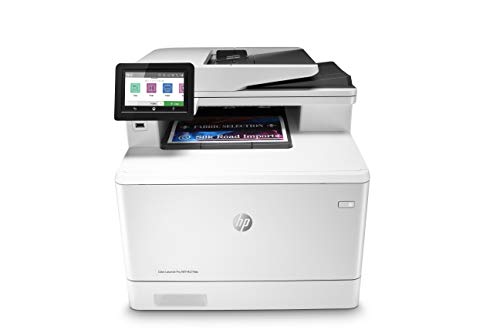
Key Specs:
- Print speed: 27 PPM color, 28 PPM mono
- Functions: Print, scan, copy, fax
- Paper capacity: 300 sheets (expandable)
- Connectivity: USB, WiFi, Ethernet, NFC
- Duty cycle: Up to 50,000 pages/month
- 4.3-inch color touchscreen
- 50-sheet ADF with single-pass duplex
Premium Features:
- Large, intuitive color touchscreen
- Advanced security features
- HP Smart app integration
- Fast scanning and copying
- Excellent color consistency
- JetIntelligence toner technology
- Workflow automation capabilities
Pros & Cons:
Pros:
- Comprehensive feature set
- Excellent color quality
- Fast all-around performance
- Advanced security options
Cons:
- Higher price point
- Toner cartridges are expensive
- Large footprint
Perfect for: Professional offices needing maximum features, security, and color quality in one package
Toner Costs: Black: ~$75 (2,700 pages) | Color: ~$85 each (2,300 pages)
Cost per page: ~2.8¢ mono, ~11¢ color
Price: ~$764.89 on Amazon
Check price on AmazonToner Cost Comparison
Understanding toner costs is crucial for calculating total cost of ownership. Here's a detailed comparison of running costs for our top picks:
| Model | Black CPP | Color CPP | Black Yield | Color Yield | Annual Cost* |
|---|---|---|---|---|---|
| HP M255dw | 3.0¢ | 8.0¢ | 1,250 | 1,250 | $330 |
| Brother HL-L3280CDW | 2.8¢ | 7.0¢ | 2,300 | 1,800 | $308 |
| Canon MF743Cdw | 1.4¢ | 6.7¢ | 6,300 | 5,000 | $252 |
| HP M455dn | 1.2¢ | 5.3¢ | 7,500 | 6,000 | $216 |
| Brother MFC-L3780CDW | 3.0¢ | 8.6¢ | 3,000 | 2,300 | $348 |
| Lexmark CS331dw | 3.7¢ | 8.7¢ | 1,500 | 1,500 | $372 |
| Canon LBP646Cdw | 6.3¢ | 15.0¢ | 1,200 | 1,200 | $636 |
| HP M479fdw | 2.8¢ | 11.0¢ | 2,700 | 2,300 | $420 |
*Annual cost based on 3,000 pages (50% black, 50% color). CPP = Cost Per Page. Yields based on ISO/IEC 19798 standard testing.
Color Laser vs Inkjet: Which is Right for You?
Choosing between a color laser printer and an inkjet depends on your specific printing needs, volume, and budget. Here's a comprehensive comparison to help you decide:
Color Laser Printers
Best For:
- High-volume business printing
- Professional documents and presentations
- Marketing materials and brochures
- Offices with multiple users
- Fast turnaround needs
- Environments where prints sit idle
Advantages:
- Fast print speeds (15-30 PPM color)
- Lower cost per page for color
- No ink drying or clogging
- Water-resistant output
- Handles high monthly volumes
- Toner lasts months without use
- Professional, consistent quality
Disadvantages:
- Higher upfront cost ($200-$600+)
- Larger and heavier units
- Not ideal for photo printing
- Four cartridges to replace
- Warm-up time required
Inkjet Printers
Best For:
- Home users with light printing needs
- Photo printing enthusiasts
- Small print volumes (under 500/month)
- Limited desk space
- Borderless photo prints
- Occasional color printing
Advantages:
- Lower upfront cost ($50-$300)
- Excellent photo quality
- Compact, lightweight design
- Wider color gamut
- Borderless printing capability
- Instant-on (no warm-up)
- Can print on various media
Disadvantages:
- Slower print speeds (5-15 PPM color)
- Higher cost per page
- Ink can dry out and clog
- Not water-resistant
- Poor for high-volume printing
Quick Decision Guide:
- Choose Color Laser if: You print 200+ color pages monthly, need fast speeds, require professional document quality, or have multiple users sharing the printer
- Choose Inkjet if: You print fewer than 200 pages monthly, need photo-quality prints, have limited space, or are on a tight budget for initial purchase
- Consider Tank Inkjet if: You need photo quality but have moderate volume (200-1000 pages/month) and want lower running costs than cartridge inkjets
Color Laser Printer Buying Guide
1. Assess Your Print Volume
- Light Use (0-500 pages/month): Budget models like Lexmark CS331dw or Brother HL-L3280CDW offer excellent value
- Medium Use (500-2,000 pages/month): Mid-range options like HP Color LaserJet Pro M255dw provide the best balance
- Heavy Use (2,000-5,000 pages/month): Enterprise models like HP Color LaserJet Enterprise M455dn handle high volumes efficiently
- Very Heavy Use (5,000+ pages/month): Consider workgroup printers with monthly duty cycles of 80,000+ pages
2. Determine Required Functions
Print-Only Models:
- Lower cost and smaller footprint
- Faster print speeds
- Simpler operation and maintenance
- Best for dedicated printing tasks
- Examples: HP M255dw, Brother HL-L3280CDW
All-in-One Models:
- Print, scan, copy, sometimes fax
- Consolidates multiple devices
- Saves space despite larger size
- Better for complete office solution
- Examples: Canon MF743Cdw, Brother MFC-L3780CDW
3. Consider Key Specifications
Print Speed:
Measured in pages per minute (PPM). Color laser printers typically offer 15-30 PPM for color prints.
- 15-20 PPM: Acceptable for light use
- 20-25 PPM: Good for most office environments
- 25-30+ PPM: Excellent for high-productivity needs
First Page Out Time (FPOT):
Time from print command to first page completion. Important for single-page prints.
- Under 10 seconds: Excellent
- 10-15 seconds: Good
- Over 15 seconds: Acceptable for batch printing
Paper Capacity:
Total sheets the printer can hold. Higher capacity means fewer refills.
- 250-300 sheets: Standard for most models
- 350-500 sheets: Good for busy offices
- 500+ sheets: Best for high-volume environments
Monthly Duty Cycle:
Maximum pages the printer can handle monthly. Choose a model with a duty cycle 3-5x your expected volume.
- 30,000 pages: Entry-level to mid-range
- 50,000 pages: Professional/small business
- 80,000+ pages: Enterprise/workgroup
4. Evaluate Connectivity Options
- USB: Essential for direct computer connection. Universal standard.
- WiFi: Crucial for mobile printing and multiple device access. Highly recommended.
- Ethernet: Important for business networks. More stable than WiFi for office use.
- NFC/WiFi Direct: Convenient for quick mobile printing without network setup.
- Mobile Apps: HP Smart, Brother Mobile Connect, Canon PRINT enable smartphone/tablet printing.
5. Calculate Total Cost of Ownership
Don't just consider the purchase price. Factor in toner costs, which significantly impact long-term expenses:
Example Calculation (3-year ownership):
Printer A: $250 purchase + $300/year toner = $1,150 total
Printer B: $400 purchase + $200/year toner = $1,000 total
Printer B saves $150 over 3 years despite higher upfront cost!
6. Important Features to Consider
Essential Features:
- Automatic duplex (two-sided) printing
- WiFi connectivity
- Mobile printing support
- Adequate paper capacity (250+ sheets)
- Reasonable toner costs
Nice-to-Have Features:
- Color touchscreen display
- Automatic document feeder (ADF)
- High-yield toner options
- Security features (for business)
- Expandable paper trays
7. Brand Considerations
- HP: Industry leader with excellent color quality, security features, and widespread support. Premium pricing but reliable performance.
- Brother: Known for reliability, value, and low running costs. Excellent for small businesses and home offices.
- Canon: Strong reputation for color accuracy and build quality. imageCLASS line is well-regarded in business environments.
- Lexmark: Good value proposition with solid performance. Popular in corporate environments.
Color Laser Printer Maintenance Tips
Regular Maintenance:
- Clean the paper path monthly with a lint-free cloth
- Replace all four toner cartridges when indicated (don't mix old and new)
- Use high-quality laser paper for best results
- Keep the printer in a clean, dust-free environment
- Print at least 20-30 color pages weekly to prevent toner settling
- Update firmware regularly for optimal performance
- Clean the corona wires according to manual instructions
Common Issues & Solutions:
- Faded colors: Replace low toner or check print density settings
- Color streaks: Clean imaging drum or replace worn drum unit
- Registration problems: Run calibration utility from printer menu
- Paper jams: Check paper type, fan sheets before loading, inspect rollers
- Slow color printing: Check quality settings, ensure adequate RAM
- Incorrect colors: Run color calibration, check toner installation
Extending Toner Life:
Save money by maximizing toner efficiency:
- Use "Draft" or "Economode" for internal documents
- Print in grayscale when color isn't necessary
- Consider high-yield toner cartridges for lower per-page costs
- Don't shake or tilt toner cartridges excessively
- Store spare toner in a cool, dry place away from sunlight
Frequently Asked Questions
Are color laser printers worth it?
Yes, color laser printers are worth it for businesses that regularly print marketing materials, presentations, or professional documents. They offer faster speeds than inkjets, lower per-page costs for color printing, and no issues with dried-out cartridges. The higher upfront cost is offset by lower long-term operational costs. For home users who print occasionally, a budget inkjet might be more economical.
What is the difference between single-pass and multi-pass color laser printers?
Single-pass color laser printers apply all four toner colors (CMYK) in one pass through the imaging system, resulting in faster print speeds and better color registration. Multi-pass printers apply each color separately in multiple passes through the drum, making them slower. Most modern color laser printers use single-pass technology, though it's typically more expensive. Single-pass models can print color documents at speeds comparable to monochrome printing.
How much does color laser toner cost?
Color laser toner costs vary by model but typically range from 6-15 cents per page for color prints and 2-4 cents for black and white. High-yield toner cartridges offer better value. For example, the HP Color LaserJet Pro M255dw costs approximately 8 cents per color page, while the Brother HL-L3280CDW costs around 7 cents per color page. Enterprise models like the HP M455dn can achieve costs as low as 5.3 cents per color page with high-yield cartridges.
Can color laser printers print photos?
Color laser printers can print photos, but they're not ideal for this purpose. They produce good results for business presentations and graphics but lack the photo quality of dedicated photo inkjet printers. Laser printers use CMYK toner which has a smaller color gamut than 6-color or 8-color photo inkjets, and they typically can't print on glossy photo paper. For professional photo printing, an inkjet photo printer is the better choice.
What is the best budget color laser printer?
The Lexmark CS331dw is one of the best budget color laser printers, offering excellent value at around $299. It provides fast color printing, WiFi and Ethernet connectivity, automatic duplex printing, and reasonable toner costs. The Brother HL-L3280CDW is also an excellent budget option with slightly better features at a comparable price point, offering 25 PPM speeds and high-yield toner options that reduce long-term costs.
How long do color laser printers last?
Color laser printers typically last 5-7 years with proper maintenance, often printing 100,000 to 300,000 pages over their lifetime. Key factors affecting longevity include monthly print volume relative to the rated duty cycle, regular maintenance (cleaning, timely toner replacement), and using genuine or high-quality compatible toner. Business-grade models from HP, Brother, and Canon tend to have the longest lifespans. Home-office models may last longer in years but typically handle lower total page counts.
Do I need to replace all four color toners at once?
No, you don't need to replace all four toner cartridges simultaneously. Color laser printers monitor each cartridge independently, and you only replace them as they run out. However, black toner typically depletes faster since it's used for text and in combination with color printing. When replacing toner, it's important to use cartridges from the same manufacturer batch when possible to ensure color consistency across prints.
What paper should I use with color laser printers?
Use high-quality laser paper rated at 24-32 lb (90-120 gsm) for best results with color laser printers. Avoid inkjet-specific paper, as it's designed differently and can cause poor toner adhesion or jams. For presentations and marketing materials, choose laser-specific glossy or matte finishes. Standard multipurpose copy paper works fine for everyday documents. Always check your printer's manual for supported paper weights and types to avoid jams and ensure optimal output quality.
Ready to Choose Your Color Laser Printer?
Our top pick, the HP Color LaserJet Pro M255dw, offers the perfect balance of speed, quality, and value for most users. For budget-conscious buyers, the Brother HL-L3280CDW delivers exceptional performance at a lower price point.