Best Printer for Restaurants 2026: Complete Guide
Menu printers, kitchen ticket printers, and label solutions for restaurants, cafes, and food service operations.
Quick Answer: Best Printers for Restaurants 2026
For menus: Canon PIXMA iX6820 ($250) - wide format, vibrant colors. For kitchen tickets: Epson TM-T88VI ($300) - industry standard, ultra-reliable. For food labels: Brother QL-820NWB ($200) - fast, waterproof labels.
Top 3 Picks for 2026
Tap any product to see current Amazon prices

Canon Pixma iX6820

DYMO LabelWriter 4XL

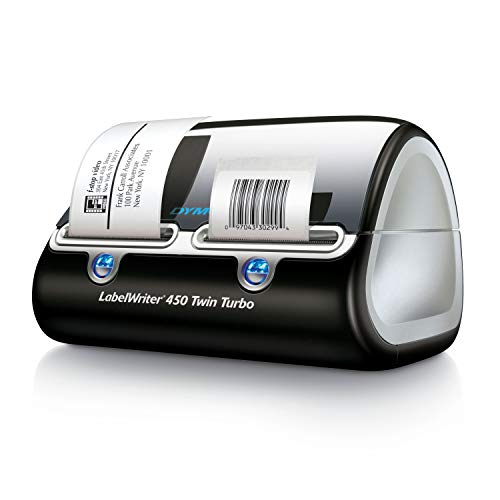
DYMO LabelWriter 450 Turbo
As an Amazon Associate, we earn from qualifying purchases
Table of Contents
Best Menu Printers for Restaurants
Whether you're printing daily specials, seasonal menus, or table tents, you need a printer that produces vibrant, professional-looking output quickly.
Canon PIXMA iX6820
13x19 wide-format color inkjet
Key Features:
- Prints up to 13x19 (tabloid+)
- 5-color ink system for vivid photos
- WiFi and USB connectivity
- 9600 x 2400 dpi resolution
- High-yield XXL cartridges available
Best For:
- Full-size restaurant menus
- Table tents and promotional cards
- Window signage
- Food photography prints

HP Color LaserJet Pro M454dw
Color laser for daily menu printing
Key Features:
- 28 ppm color printing
- Auto-duplex for two-sided menus
- Toner won't dry out between uses
- Low cost per page for volume
- JetIntelligence toner technology
Best For:
- Restaurants printing menus daily
- Fast-casual with rotating specials
- Multi-location chains
- Catering companies
Menu Printing Tips
- Laminate for longevity: Use a laminating machine for menus that will be handled frequently
- Use card stock: 80-100 lb card stock feels premium and holds up better
- Consider inserts: Permanent menu + daily special inserts saves money
- QR codes: Link to digital menus for easy updates
Best Kitchen Ticket Printers
Kitchen printers need to survive heat, grease, and high-volume use. These thermal printers connect to your POS system and print order tickets in under a second.
Epson TM-T88VI
Thermal receipt/ticket printer
Key Features:
- 350mm/sec print speed
- USB, Ethernet, Bluetooth options
- Compatible with most POS systems
- 50 million line MCBF reliability
- Auto-cutter included
Best For:
- Full-service restaurant kitchens
- High-volume operations
- Multi-station kitchen setups
- Toast, Square, Clover POS
Star TSP143IIIBI
Bluetooth thermal printer
Key Features:
- Bluetooth + USB connectivity
- 250mm/sec print speed
- Works with iPad POS systems
- Drop-in paper loading
- Splash-resistant design
Best For:
- Small restaurants and cafes
- Food trucks
- iPad-based POS (Square, Toast)
- Single-station kitchens
Epson TM-U220B
Impact dot-matrix kitchen printer
Key Features:
- Two-color printing (red highlights)
- Paper doesn't fade in heat
- Audible print sound alerts staff
- Works in extreme temperatures
- Carbon copies possible
Best For:
- Near grills and fryers
- High-heat environments
- Operations needing carbon copies
- Red highlighting for mods
Note: Impact printers are louder but tickets won't fade or turn black near heat sources like thermal tickets can.
Best Food Label Printers
Label printers are essential for food safety compliance, prep dating, allergen warnings, and delivery packaging. Look for waterproof, smudge-resistant output.
Brother QL-820NWB
Professional label printer
Key Features:
- WiFi, Ethernet, Bluetooth, USB
- Prints up to 110 labels/minute
- Red/black two-color labels
- Works standalone with LCD
- Multiple label sizes supported
Best For:
- Food prep date labels
- Allergen warnings (red text)
- Delivery/to-go labels
- Ingredient labels
DYMO LabelWriter 450
Compact thermal label printer
Key Features:
- Simple USB connection
- 51 labels per minute
- Wide range of label sizes
- Compact footprint
- Low cost per label
Best For:
- Small restaurants
- Basic prep labeling
- Delivery address labels
- Simple date coding
Food Safety Labeling Requirements
- Date marking: Ready-to-eat TCS foods must be marked with 7-day discard date
- Allergen warnings: Big 9 allergens must be clearly identified
- Labels must be: Waterproof, smudge-resistant, legible
- Check local codes: Requirements vary by jurisdiction
POS System Integration
Your kitchen printers need to work seamlessly with your POS system. Here's what works with popular platforms:
Toast POS
- Epson TM-T88VI (recommended)
- Epson TM-U220B
- Star TSP143III series
Square for Restaurants
- Star TSP143IIIBI (Bluetooth)
- Epson TM-m30II
- Star SM-S230i (portable)
Clover
- Clover Kitchen Printer
- Star TSP650II
- Epson TM-T88VI
TouchBistro
- Star TSP143IIIW (WiFi)
- Epson TM-m30
- Star SM-L200
Integration Tips
- Verify compatibility with your POS provider before purchasing
- Ethernet connections are more reliable than WiFi in busy kitchens
- Get the same printer model for all stations to simplify training and supplies
- Keep spare thermal paper rolls on hand - running out during service is painful
Frequently Asked Questions
What printer do restaurants use for menus?
Most restaurants use color inkjet or laser printers for menus. The Canon PIXMA iX6820 is popular for its 13x19 capability and vibrant colors. For laminated menus, any quality inkjet works. For daily printed menus, laser printers are more economical for high-volume printing.
What type of printer is used in restaurant kitchens?
Kitchen ticket printers are thermal or impact printers designed for heat and grease environments. Popular models include the Epson TM-T88VI and Star TSP143IIIBI. They connect to POS systems and print order tickets quickly on heat-resistant paper.
Should I use thermal or impact printers for the kitchen?
Thermal printers are faster and quieter, but tickets can darken or fade near heat sources. Impact (dot matrix) printers are louder but produce tickets that won't fade near grills or fryers. Use thermal for expo stations, impact near cooking equipment.
What labels work for food prep dating?
Use thermal direct labels designed for food service - they're waterproof, won't smudge, and can handle refrigerator/freezer temperatures. Popular options are DayMark and DateIt labels. The Brother QL-820NWB can print two-color labels with red for allergen warnings.
How many kitchen printers do I need?
At minimum: one for the kitchen line. Add more for separate stations (grill, saute, pantry) in larger operations. Consider one for the bar if drinks need tickets, and one for expo. Multiple printers reduce congestion and speed up order processing.
Our Final Recommendation
For a complete restaurant printing setup, we recommend:
- Menus & signage: Canon PIXMA iX6820 for vibrant wide-format printing
- Kitchen tickets: Epson TM-T88VI - industry standard reliability
- Food labels: Brother QL-820NWB for two-color allergen-safe labels