
Your business printer is the unsung hero of daily operations—invoices, contracts, marketing materials, and client documents all depend on it. Choosing the wrong printer means wasted money on expensive ink, frustrating jams during critical deadlines, and security vulnerabilities that could expose sensitive data.
After researching 25+ business printers against manufacturer specs and verified owner reviews, we've identified the best options for small businesses in 2026. Whether you're a solo entrepreneur, a growing startup, or a 50-person office, this guide will help you find the perfect balance of speed, quality, reliability, and total cost of ownership.

1 Why the Right Printer Matters for Business
The difference between a consumer printer and a business-grade printer isn't just marketing—it's measured in uptime, security, and dollars saved. Here's what's at stake:
The Cost of Cheap Printers
- • $0.15-0.30 per color page in ink
- • Frequent paper jams during deadlines
- • No network security features
- • Slow 8-12 ppm print speeds
- • 1,000-2,000 page monthly duty cycle
Business Printer Benefits
- • $0.01-0.05 per page with tank/laser
- • 99.9% uptime with auto-maintenance
- • Enterprise security & encryption
- • Fast 20-50+ ppm output
- • 20,000-100,000+ monthly duty cycle
The 3-Year Cost Reality
A $150 consumer inkjet printing 500 pages/month costs approximately $3,600 in ink over 3 years. A $600 business tank printer costs only $200 in ink for the same volume—saving over $3,000. Always calculate total cost of ownership, not just upfront price.
2 Inkjet vs Laser: Which Technology for Your Business?
The inkjet vs laser decision depends on what you print, how much you print, and whether color quality matters for your documents.
| Factor | Laser | Inkjet (Cartridge) | Inkjet (Tank) |
|---|---|---|---|
| Cost per B&W Page | $0.01-0.03 | $0.05-0.10 | $0.003-0.01 |
| Cost per Color Page | $0.08-0.15 | $0.15-0.30 | $0.01-0.03 |
| Print Speed | 25-50+ ppm | 15-25 ppm | 15-25 ppm |
| Photo Quality | Good | Excellent | Excellent |
| Text Sharpness | Excellent | Good | Good |
| Best For | High-volume text | Low-volume color | High-volume color |
Choose Laser If:
- • You print 500+ pages/month
- • Documents are mostly text
- • Speed is critical
- • You need ultra-sharp text
Choose Tank Inkjet If:
- • You need lowest running costs
- • Marketing materials matter
- • Photos and graphics are common
- • You want flexibility
Avoid Cartridge Inkjet If:
- • You print 200+ pages/month
- • Cost control is important
- • You hate buying cartridges
- • Sustainability matters
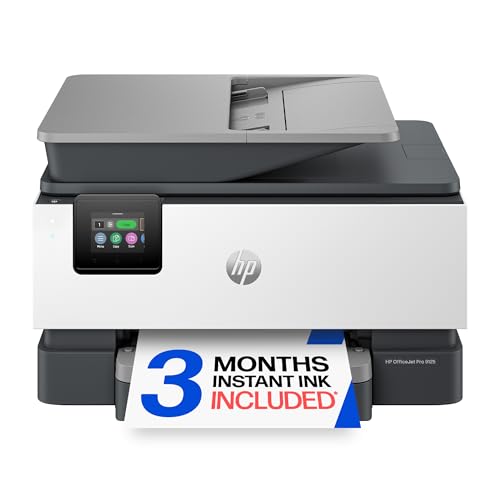
3 HP OfficeJet Pro 9125e — Best Overall
HP OfficeJet Pro 9125e
HP's flagship business all-in-one combines professional color output with enterprise-grade security. The Smart Advance Scan feature automatically optimizes document scans, while HP Wolf Pro Security protects against network threats.
Pros
- ✓ Enterprise-grade security features
- ✓ Fast color and black printing
- ✓ 35-sheet ADF with duplex scanning
- ✓ Intuitive 2.7" touchscreen
- ✓ Reliable dual-band WiFi
- ✓ Professional document quality
Cons
- ✗ Higher ink costs than tank systems
- ✗ Requires HP+ for some features
- ✗ No wide-format printing
- ✗ Cartridge waste concerns
The HP OfficeJet Pro 9125e represents HP's best thinking on what small businesses actually need: reliable color printing, robust security, and smart features that save time. The Smart Advance Scan feature is particularly impressive—it automatically detects document orientation, removes blank pages, and optimizes text clarity without manual intervention.
HP Wolf Pro Security sets this printer apart from consumer models. It includes real-time threat detection, self-healing firmware that repairs itself if compromised, and memory isolation to prevent malware attacks. For businesses handling sensitive documents, these features aren't optional luxuries—they're essential protection.
4 Brother MFC-L8905CDW — Best Color Laser
Brother MFC-L8905CDW
The undisputed king of business color lasers. Brother's flagship MFC prints at a blazing 32 ppm in both color and black, with the reliability that made Brother the top-rated brand in consumer reports testing.
Pros
- ✓ Industry-leading reliability
- ✓ Fastest color laser in class
- ✓ Sharp 1200x1200 dpi output
- ✓ 80-sheet ADF with duplex
- ✓ Super high-yield toner available
- ✓ Excellent text quality
Cons
- ✗ Higher upfront cost
- ✗ Large footprint
- ✗ Photo quality not as good as inkjet
- ✗ Toner replacement learning curve
For reliability, Brother lasers consistently earn top marks from owners. On the MFC-L8905CDW, owners regularly report zero jams, zero errors, and minimal maintenance over thousands of pages. For businesses where downtime costs money, this reliability is worth the premium price.
The 32 ppm print speed is truly impressive—this printer can output a 50-page report in under 2 minutes. The super high-yield toner cartridges (9,000 pages black, 6,500 color) bring the cost per page down to just $0.02 for black and $0.12 for color, making it economical for high-volume offices.

5 Epson EcoTank Pro ET-5800 — Best Value
Epson EcoTank Pro ET-5800
The ultimate cost-saver for businesses that print heavily. The ET-5800 includes 2 years' worth of ink in the box—enough for up to 14,000 black pages and 11,200 color pages. Calculate your monthly volume and watch the savings add up.
Cost Savings Calculator
*Compared to cartridge inkjets at 1,000 pages/month
6 Canon MAXIFY GX7021 — Best for Marketing Materials
Canon MAXIFY GX7021
Canon's MegaTank business printer combines stunning color quality with the low running costs of a tank system. If your business produces marketing materials, client presentations, or color-heavy documents, the GX7021 delivers print-shop quality from your desk.
7 Best Budget Business Printers Under $300
Brother MFC-L2750DW
Compact mono laser with fast 36 ppm output, 50-sheet ADF, and XL toner option. Perfect for text-heavy small offices.
HP LaserJet Pro M140we
Compact, affordable mono laser with HP+ features. Ideal for home offices and solo entrepreneurs.
Epson EcoTank ET-4850
Affordable tank system with 2-year ink supply. Great for startups needing low running costs.
HP Color LaserJet Pro M255dw
Affordable color laser with sharp output and fast printing. Good for occasional color needs.
8 High-Volume Workgroup Printers
For offices printing 5,000+ pages monthly or teams of 10+ employees sharing a single device, these workgroup printers deliver enterprise-level performance:
Brother HL-L5100DN
Mono laser workhorse: 42 ppm, 100,000 page duty cycle, dual paper trays. $0.01/page with high-yield toner.
HP LaserJet Enterprise M507dn
Enterprise mono: 45 ppm, advanced security, 150,000 page duty. Fleet management ready.
9 Complete Cost Per Page Comparison
| Printer | Upfront Cost | B&W/Page | Color/Page | 3-Year Cost* |
|---|---|---|---|---|
| Epson EcoTank Pro ET-5800 | $649 | $0.003 | $0.01 | $865 |
| Brother MFC-L8905CDW | $649 | $0.02 | $0.12 | $1,729 |
| HP OfficeJet Pro 9125e | $199.99 | $0.03 | $0.09 | $1,409 |
| Consumer Inkjet (avg) | $150 | $0.08 | $0.20 | $3,510 |
*Based on 500 pages/month, 50% color mix, over 36 months including ink/toner
10 Business Printer Security Features Explained
Network-connected printers are potential entry points for cyberattacks. Modern business printers include security features that consumer models lack:
Secure Boot & Firmware Validation
Verifies firmware integrity at startup, preventing tampered software from running. HP Wolf Pro and Brother's secure systems lead here.
Encrypted Data Transmission
SSL/TLS encryption for all network communication prevents document interception. Essential for legal, medical, and financial businesses.
User Authentication
PIN codes, ID cards, or mobile authentication ensure only authorized users access the printer. Prevents sensitive documents from sitting in output trays.
Secure Print Release
Documents held in queue until user authenticates at the printer. Prevents confidential printouts from being seen by others.
11 Complete Buying Guide: Choosing Your Business Printer
Step 1: Calculate Your Monthly Volume
Count how many pages your team prints monthly. Under 200? A budget inkjet works. 200-1,000? Tank inkjet or basic laser. 1,000+? Business laser or high-capacity tank.
Step 2: Assess Color Needs
Mostly text documents? Mono laser saves money. Marketing materials and client presentations? Invest in quality color. Mixed use? Color tank systems offer flexibility.
Step 3: Consider Essential Features
Must-haves: Auto duplex printing, WiFi/Ethernet, ADF for scanning. Nice-to-haves: Touchscreen, mobile printing, extra paper trays, fax capability.
Step 4: Calculate Total Cost of Ownership
Upfront price + (monthly pages × cost per page × 36 months) = true 3-year cost. The cheapest printer is rarely the cheapest to operate.
12 Frequently Asked Questions
What is the best printer for a small business in 2026? ▼
How many pages should a business printer handle per month? ▼
Are tank printers reliable for business use? ▼
What's the most reliable printer brand for business? ▼
Ready to Upgrade Your Business Printing?
Choose the printer that matches your volume and budget